Icon of program: Fresh UI

Fresh UI for Windows

  • Free
  • 3.3
    86
  • 4.7K
  • V8.82
Free Download for Windows

View an ad to download for free

Configure and optimize multiple Windows settings

Geeks are notorious for wanting to play around with their computers. A tweak here, a change there - it's only when we are modifying settings that we're truly happy. Fresh UI is a tool that will give you direct access to many of these areas, from file settings to shutdown configuration and processor specs to power policies, allowing you to change default settings and modify options.

Top Recommended Alternative

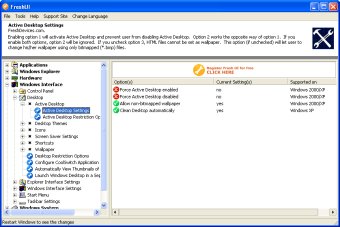
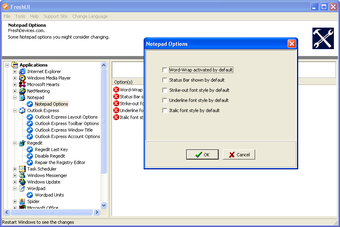
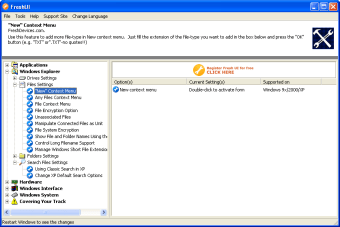
The Fresh UI interface is really very basic, but some users won't mind. Areas you can modify are displayed in tree format on the left of the window, the sub-options on the right and a brief description of the action to be carried out above. Double clicking on an individual task will bring up a new window where you can make your changes. Depending on the option, there'll be one or several fields you can change.

Unfortunately, not all of Fresh UI's options are very well-explained. Advanced users won't have a problem, but the less-experienced will have to do a bit of research on their own. Fresh UI is not a very exciting or comfortable program, so whether or not you will want to download it depends entirely on the whether the tweaks it offers meet your needs. If it does, then Fresh UI is a free, no-frills but functional tool.

If you need its specific functions, Fresh UI will get the job done.

  • Pros

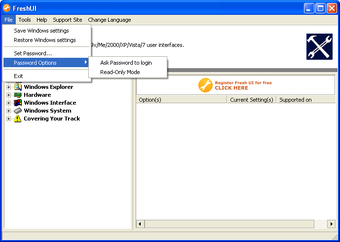
    • Password protection
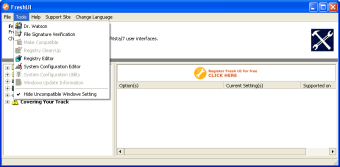
    • Hide incompatible settings option
  • Cons

    • Very basic interface
    • Not all options explained as well as they should be
    • Internet settings only apply to Internet Explorer
    • Language settings very basic
 0/6

App specs

  • Developer

  • License

    Free

  • Version

    8.82
  • Latest update

  • Platform

    Windows

  • OS

    Windows ME

  • Language

    English

    Available languages

    • Arabic
    • German
    • Greek
    • English
    • Spanish
    • French
    • Italian
    • Korean
    • Portuguese
    • Russian
  • Downloads

    4.7K

  • Size

    1.63 MB

Program available in other languages


Icon of program: Fresh UI

Fresh UI for PC

  • Free
  • 3.3
    86
  • 4.7K
  • V8.82
Free Download for PC

View an ad to download for free


User reviews about Fresh UI

3.3

1 reviews

Add review

Main reviews for you

  • Anonymous user

    Excellent Tweaker. FreshUI is one of four apps that FreshDevices offers. It is a very unique and awesome tweaking app to use. Unlike other tweaking apps, it offers many tweaks for all sorts of windows operating systems. Do keep in mind that most of its tweaks are meant for certain OS versions only. Most of the tweaks may not work with your OS. Luckily, not only does it tell you which tweak works with which OS but you can configure it to only show tweaks that work with your OS. Though its kinda hard to configure. This software is indeed free, BUT, you need to get a registration code for the software. It is easy to do and once you register your all done. Nothing to purchase or anything. You do have to give them your email (to receive registration code) but I have had no spam problems or anything. I think I was also given the option to receive a notice in my email when a new version is available but am not sure. I don't remember if I had an option or not. Updating is also easy. No need to register again. I would also like to state that it doesn't really tweak for performance, though some of its tweaks may do that. It offers tweaks for things like the games builtin to the OS, such as solitaire, and numerous others for the control panel, system, files, etc. Overall, software worth trying. But you may not want to use if you do not want to give an email address. Pros: -Functional-Stable-Many tweaks-Tweaks for all sorts of windows OS(I think from win98-Vista)(Maybe win95)-Is free Cons: -Requires registration which means giving them your email address to receive your registration code. (I have not received spam so it maybe safe)



More

You may also like

Alternatives to Fresh UI

Explore Apps

Latest articles

Laws concerning the use of this software vary from country to country. We do not encourage or condone the use of this program if it is in violation of these laws.
Softonic

Is Fresh UI safe?

Score result: Clean

This file passed a comprehensive security scan using VirusTotal technology. It is safe to download.

  • Virus free
  • Spyware free
  • Malware free
  • Verified by Security Partners

    VirusTotal logo

Scan Info

Last scan
Wednesday, December 2, 2020
Scan provider
VirusTotal

Softonic security commitment

Fresh UI has been thoroughly scanned by our advanced security systems and verified by industry-leading partners. This file comes from the official developer and has passed all our security checks, showing no signs of viruses, malware, or spyware. For more information, visit our Security and Trust Center

Signed in to Softonic as